Using Python in Lazarus on Windows/Linux/ru
English · Русский
Введение
Мне нужно было сделать кроссплатформенное приложение для Windows/Linux/Mac, в которое встроен движок Python. Я попробовал Python4Delphi, но он не компилировался и не работал на Linux x64 и Mac. Приложение должно использовать portable Python в Windows и встроенный Python в Linux/Mac.
Обновлено Python4Delphi: Коммит от 21.1.2018 объявляет совместимость с Lazarus и (я надеюсь) Delphi Linux
Результаты
Репозиторий Github: https://github.com/Alexey-T/Python-for-Lazarus
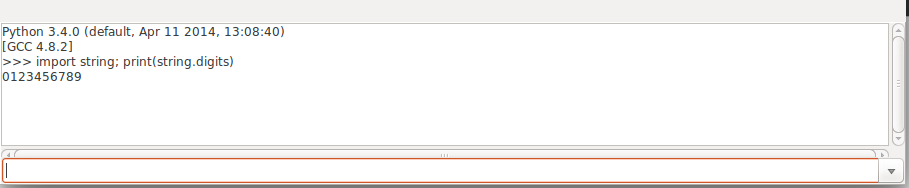
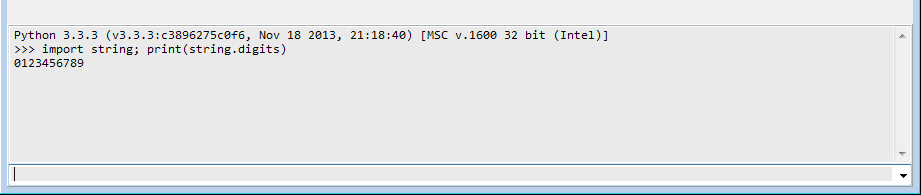
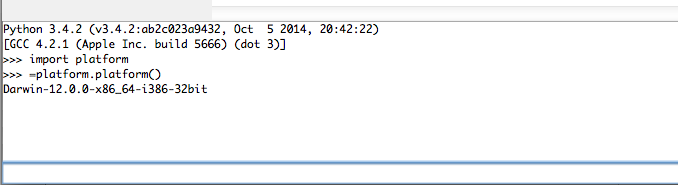
Имеется демо, которое показывает TEdit+TMemo в консоли Python, чтобы вводить команды в Edit и показывать результаты в Memo. Специальный символ "=" в начале текста означает выполнение "print(...)".
Скриншот на Ubuntu 14 x64:
Скриншот на Windows 7 x64:
Скриншот на macOS 10.8:
Репозиторий создан на базе пакета Python4Delphi. Компилируется и устанавливается как пакет Lazarus. Вы увидите вкладку "Python" в палитре компонентов IDE. В чём отличия от оригинального Python4Delphi:
- удалены все ссылки на модули, содержащие в имени "..Delphi..", кажется они не нужны приложениям Lazarus.
- изменения в PythonEngine.pas, смотрите строки, начинающиеся с "//AT".
- добалена поддержка macOS, наприме "$ifdef linux" заменён на "$ifdef unix".
Файлы для Windows
В Windows нужно скопировать файлы в папку приложения.
Python 3.3
Из папки "Sublime Text 3" в пакете для Windows, возьмите файлы Python:
- python33.dll
- msvcr100.dll
- python33.zip
- .pyd files, скопируйте их в подпапку DLLs
Python 3.5 или новее
Вам нужны файлы для другой версии Python: *.dll, .pyd, python.zip. Возьмите их на официальном сайте Python.org:
- "Windows x86 embeddable zip file" для 32-разрядного приложения
- "Windows x86-64 embeddable zip file" для 64-разрядного приложения
Также вам надо заменить свойство компонента для Lazarus на вашу версию Python: DllName и/или DllPath. Смотрите в демонстрационной программе как их задать.
procedure TfmMain.DoPy_InitEngine;
var
  S: string;
begin
  S:=
    {$ifdef windows} cPyLibraryWindows {$endif}
    {$ifdef linux} cPyLibraryLinux {$endif}
    {$ifdef darwin} cPyLibraryMac {$endif} ;
  PythonEngine.DllPath:= ExtractFileDir(S);
  PythonEngine.DllName:= ExtractFileName(S);
  PythonEngine.LoadDll;
end;
Файл манифеста
Файл манифеста во всех версиях Python должен называться "appname.exe.manifest".
  <?xml version="1.0" encoding="UTF-8" standalone="yes"?>
  <assembly xmlns="urn:schemas-microsoft-com:asm.v1" manifestVersion="1.0">
    <noInheritable/>
    <assemblyIdentity
        type="win32"
        name="DelphiApplication"
        version="1.0.0.0"
        processorArchitecture="*"/>
    <dependency>
      <dependentAssembly>
        <assemblyIdentity type='win32' name='Microsoft.Windows.Common-Controls' version='6.0.0.0' processorArchitecture='*' publicKeyToken='6595b64144ccf1df' language='*' />
      </dependentAssembly>
    </dependency>
    <trustInfo xmlns="urn:schemas-microsoft-com:asm.v3">
      <security>
        <requestedPrivileges>
          <requestedExecutionLevel level='asInvoker' uiAccess='false' />
        </requestedPrivileges>
      </security>
    </trustInfo>
  </assembly>
Файлы в MacOS
macOS не содержит предустановленный Python. Пользователю надо установить дистрибутив Python 3 (демо должно работать с Py 3.4) с официального сайта http://www.python.orgg
Затем полный путь до библиотек Python library должен быть установлен в коде программы. Этот путь определить легко, он всегда стандартный типа "/Library/Frameworks/Python.framework/Versions/3.5/lib/libpython3.5.dylib" (с разными номерами 3.x).
Код
Форма
Поместите на форму:
- TPythonEngine
- TPythonInputOutput
- TCombobox (edConsole)
- TMemo (memoConsole)
Свойства PythonEngine:
- AutoLoad=False
- DllName empty
- DllPath empty
- FatalAbort=False
- InitScript="import sys; print('Python', sys.version)"
- IO=PythonInputOutput1
- PyFlags=[pfIgnoreEnvironmentFlag]
- UseLastKnownVersion=False
Обработчики событий
- PythonEngine.OnAfterInit: должен быть установлен "sys.path" для Win (помните, мы используем portable py для Win).
procedure TfmMain.PythonEngineAfterInit(Sender: TObject);
var
  dir: string;
begin
  {$ifdef windows}
  dir:= ExtractFilePath(Application.ExeName);
  Py_SetSysPath([
    dir + 'DLLs',
    dir + 'python33.zip'
    ]);
  {$endif}
end;

procedure Py_SetSysPath(const Dirs: array of string);
var
  Str: string;
  i: Integer;
begin
  Str:= '';
  for i:= 0 to Length(Dirs)-1 do
    Str:= Str + 'r"' + Dirs[i] + '"' + ',';
  Str:= Format('sys.path = [%s]', [Str]);
  GetPythonEngine.ExecString(Str);
end;- PythonInputOutput.OnSendData, OnSendUniData:
procedure TfmMain.PythonInputOutput1SendData(Sender: TObject;
  const Data: AnsiString);
begin
  memoConsole.Lines.Add(Data);
end;

procedure TfmMain.PythonInputOutput1SendUniData(Sender: TObject;
  const Data: UnicodeString);
begin
  memoConsole.Lines.Add(Data);
end;- edConsole.OnKeyPress:
procedure TfmMain.edConsoleKeyPress(Sender: TObject; var Key: char);
var
  Str: string;
begin
  if Key=#13 then
  begin
    Str:= edConsole.Text;

    //support entering "=some cmd"
    if (Str<>'') and (Str[1]='=') then
      Str:= 'print('+Copy(Str, 2, MaxInt) + ')';

    memoConsole.Lines.Add('>>> '+Str);
    edConsole.Text:= '';
    edConsole.Items.Insert(0, Str);
    try
      GetPythonEngine.ExecString(Str);
    except
    end;
  end;
end;- main form OnCreate:
const
  cPyLibraryWindows = 'python33.dll';
  cPyLibraryLinux = 'libpython3.4m.so.1.0';
  cPyLibraryMac = '/Library/Frameworks/Python.framework/Versions/3.4/lib/libpython3.4.dylib';

procedure TfmMain.FormCreate(Sender: TObject);
var
  S: string;
begin
  S:=
    {$ifdef windows} cPyLibraryWindows {$endif}
    {$ifdef linux} cPyLibraryLinux {$endif}
    {$ifdef darwin} cPyLibraryMac {$endif} ;
  PythonEngine.DllPath:= ExtractFileDir(S);
  PythonEngine.DllName:= ExtractFileName(S);
  PythonEngine.LoadDll;
end;
From the Free Pascal wiki, page "Using Python in Lazarus on Windows/Linux/ru", as it stood on 2023-06-02 after a change by AMXS52, out of the wiki's dump of 2024-05-26. Copyright stays with the author who wrote it, according to the old wiki's Licensing page. If you have concerns about this material, message the admin.