TFindDialog/zh CN
English · Français · Suomi · Русский · 中文(中国)
TFindDialog  是搜索的弹出对话框. 在 Dialogs tab 的 Component Palette.
对话框本身不会搜索; 仅仅是为搜索参数提供一个界面而已. 激活搜索框, 使用方法:Execute() function. 创建 OnFind method 然后咋其中搜索.
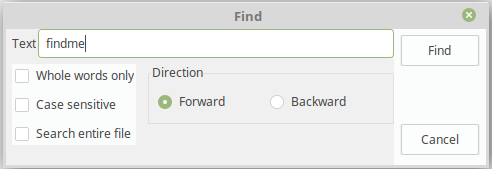
用法
如下示例显示了使用TFindDialog在(TMemo)中搜索特定内容的方法.
procedure TForm1.Button1Click(Sender: TObject);
begin
  FindDialog1.Execute();
end;

procedure TForm1.FindDialog1Find(Sender: TObject);
var
  k: integer;
begin
  with Sender as TFindDialog do begin
    k := Pos(FindText, Memo1.Lines.Text);
    if k > 0 then begin
      Memo1.SelStart := k - 1;
      Memo1.SelLength := Length(FindText);
      Memo1.SetFocus; //必须激活控件,否则不显示选择效果
    end else
      Beep();
  end;
end;
如果要继续搜索同样的内容,必须记住最后一次搜索的位置,从此处继续搜索。 unit 中的PosEx() 就是用来标记位置的:
uses
  StrUtils;

type
  TForm1 = class(TForm)
  private
    FFoundPos: Integer;
    ...

procedure TForm1.Button1Click(Sender: TObject);
begin
  with FindDialog1 do
  begin
    if frEntireScope in Options then    // Search begins at file start
      FFoundPos := 0
    else
      FFoundPos := Memo1.SelStart;      // Serach begins at current cursor position
    Execute;
  end;
end;

procedure TForm1.FindDialog1Find(Sender: TObject);
begin
  with Sender as TFindDialog do
  begin
    FFoundPos := PosEx(FindText, Memo1.Lines.Text, FFoundPos+1);
    if FFoundPos > 0 then
    begin
      Memo1.SelStart := FFoundPos - 1;
      Memo1.SelLength := Length(FindText);
      Memo1.SetFocus; //必须激活控件,否则不显示选择效果
    end else
      Beep();
  end;
end;
参考资料
From the Free Pascal wiki, page "TFindDialog/zh CN", as it stood on 2020-05-01 after a change by TyphonFinger, out of the wiki's dump of 2024-05-26. Copyright stays with the author who wrote it, according to the old wiki's Licensing page. If you have concerns about this material, message the admin.