TColorListBox
English · Esperanto · Français · Suomi · Русский
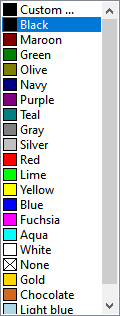 A TColorListBox
 is a component that shows a (scrollable) list of colors from which the user can select one. It is available from the Additional tab of the Component Palette.
Specific properties of TColorListBox are:
ColorRectOffset- margin around each color rectangleColorRectWidth- width of a color rectangleStyle- defines the items shown in the listbox, and how the colors are namedcbStandardColors- includes the 16 LCL standard colors in the list, e.g.clRedorclBluecbExtendedColors- includes the 4 LCL extended colors:clMoneyGreen,clSkyBlue,clCream,clMedGraycbSystemColors- includes the OS- and theme-dependent system colorscbIncludeNone- includes the special colorclNone. Use the propertyNoneColorColorto determine the replacement color. IfNoneColorColoris set toclNonethe color rectangle displays a crossed-out box like in many drawing programs.cbIncludeDefault- include the special colorclDefault. PropertyDefaultColorColordetermines the actual color displayed.cbCustomColor- the first listbox item is customizable by means of the standard color dialog.cbPrettyNames- displays "pretty" color names next to the color boxes, e.g. 'Red'. Without this option the internal color names are used, e.g. 'clRed'.cbCustomColors- includes user-provided colors at the end of the list. The colors must be defined by a stringlist in theOnGetColorsevent, like this:
  procedure TForm1.ColorListBox1GetColors(Sender: TCustomColorListBox; Items: TStrings);
  begin
    Items.AddObject('Gold', TObject(PtrInt($00D7FF)));
    Items.AddObject('Chocolate', TObject(PtrInt($1E69D2)));
    Items.AddObject('Light blue', TObject(PtrInt($E6D8AD)));
  end;
==See also==
From the Free Pascal wiki, page "TColorListBox", as it stood on 2019-08-02 after a change by Wp, out of the wiki's dump of 2024-05-26. Copyright stays with the author who wrote it, according to the old wiki's Licensing page. If you have concerns about this material, message the admin.