Reference: MSEgui/TFont
TFont
The font of text. Ancestor of classes like TWidgetFont;
Reference
Hierarchy
- TObject
- TPersistent
- TVirtualPersistent
- TNullInterfacedPersistent
- TLinkedPersistent
- TLinkedOptionalPersistent
- TFont
Properties
Colors
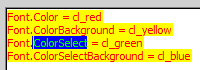
You can specify the Color of the text and it's background color. If you can select text on the widget (for example at TMemoEdit), you can also sepcify the Color of the selected text and it's background color.
Extraspace
Specifys the distance between the lines; accept negative values too.

Gloss and Shadow
Gloss and shadow both duplicate the character and move the copy the specified number of pixels. By default gloss is left and over the original character, and shadow is right and below it. If you habe both, gloss and shadow, the "layer" of gloss is over the layer of shadow. The top layer is always the original character.
If the widget is grayed (enabled = false or textflags = [tf_grayed]), neither gloss nor shadow is visible.
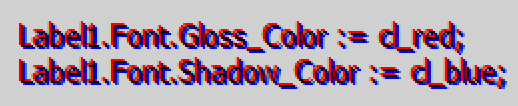
property Shadow_Solor: colorty default cl_none;
property Shadow_ShiftX: integer default 1;
property Shadow_ShiftY: integer default 1;

property Gloss_Color: colorty cl_none;
property Gloss_ShiftX: integer -1;
property Gloss_ShiftY: integer -1;
Height, Width and XScale
The propterty Height defines the size of the font in pixels. To define the horizontal stretching of the font you can use Width or XScale. Width defines the average char width in 1/10 pixels, so it's indepently of the height - if you change the height, the relations of width to height changes too.
With the usage of xscale then ratio of width to height stays constant if you're changing height. If the XScale is 1, Width is used, with all other values of XScale XScale is used.
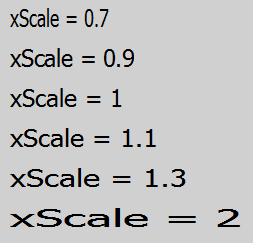
property Height: integer;
property Width: integer;  //avg. character width in 1/10 pixel, 0 = default
property xscale: real;//default 1.0
Grayed
You can specify how the Font looks like if the widget is grayed (e.g. enabled = false).
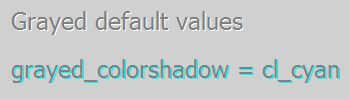
property grayed_color: colorty; //default cl_grayed
property grayed_colorshadow: colorty; //default cl_grayedshadow
property grayed_shiftx: integer default 1;
property grayed_shifty: integer default 1;
Template and LocalProps
You can assign Template to a TFontComp-instance to take the font settings of this non-visual component.
If a special property of TFont should not specified by Template but the local TFont-settings, use LocalProps to except this property of template settings for this widget. Note, that at design time always the local settings are applied, and at runtime only if LocalProps is set correctly (not sure if a bug or a feature...).
fontlocalpropty = (
  flp_color,flp_colorbackground,flp_colorselect,flp_colorselectbackground,
  flp_shadow_color,flp_shadow_shiftx,flp_shadow_shifty,
  flp_gloss_color,flp_gloss_shiftx,flp_gloss_shifty,
  flp_grayed_color,flp_grayed_colorshadow,flp_grayed_shiftx,flp_grayed_shifty,
  flp_style,flp_xscale,flp_height,flp_width,flp_extraspace,flp_name,flp_charset,
  flp_options
 );
fontlocalpropsty = set of fontlocalpropty;

property LocalProps: fontlocalpropsty;
property Template: TFontComp;
Options
You can't combine all options. There are 3 group who are mutually exclusive:
- foo_fixed and foo_proportional
- foo_helvetica, foo_roman, foo_script and foo_decorative
- foo_antialiased, foo_antialiased2 and foo_nonantialiased
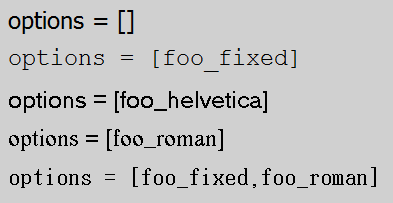
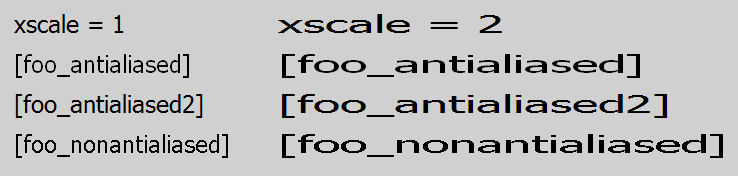
fontoptionty = (foo_fixed,            // 'p'
                 foo_proportional,     // 'P'
                 foo_helvetica,        // 'H'
                 foo_roman,            // 'R'
                 foo_script,           // 'S'
                 foo_decorative,       // 'D'
                 foo_antialiased,      // 'A'
                 foo_antialiased2,     // 'B' cleartype on windows
                 foo_nonantialiased    // 'a'
                );
fontoptionsty = set of fontoptionty;

property Options: fontoptionsty;
Style
The Styles of the font.
If you use fs_italic with TLabel (perhaps other widgets too), the last char may be cropped; You can remove ow1_autowidth of OptionsWidget1 and size the widget manually. Der better way is to enlarge Frame.Framei_right.
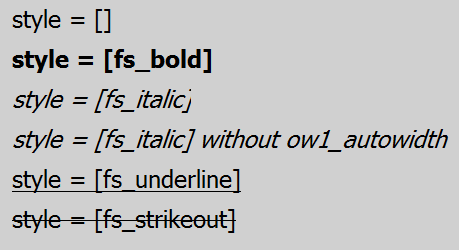
fontstylety = (fs_bold, fs_italic, fs_underline, fs_strikeout, fs_selected, fs_blank, fs_force);
fontstylesty = set of fontstylety;

property Style: fontstylesty default [];
Methods
Scale
With the Method Scale you can change Height and Width simultaneously.
procedure Scale(const ascale: real); virtual;Events
OnChange
Fired, when a propoerty changes.
property OnChange: notifyeventty;known issues
issues of the class
- fs_italic needs with TLabel (may be other widgets too) manually extension of Width or enlarging of Frame.framei_right.
issues of this documentation
Feel free to add your points here.
- What does Font.Styles fs_force ? (Answered on MailingList, but answer not integrated here)
From the Free Pascal wiki, page "Reference: MSEgui/TFont", as it stood on 2020-02-25 after a change by Trev, out of the wiki's dump of 2024-05-26. Copyright stays with the author who wrote it, according to the old wiki's Licensing page. If you have concerns about this material, message the admin.