MultiLog
About
MultiLog is a log system that aims at flexibility and low overhead at the same time. As the name suggests, it can be used to log to several targets such as a text file, a visual control or to another application. Adding new targets is as easy as creating a class that implements two methods, one being optional.
MultiLog is in general similar to CodeSite, Smart Inspect, Overseer and EstLogger but it does not follow closely any of them, implementing many things differently and, even, having some unique features.
Starting from version 0.5, the base library can be compiled with Delphi.
Features:
- Flexible:
- It's possible to define up to 32 log classes and enable/disable any combination of them
- Each message can be associated with more than one class
- There's overloaded functions for most used types: Integer, Float, Boolean, String, TStrings, TRect, TPoint
- Low overhead:
- If a log class is not active, all messages that belongs to it only do a check in the begin of the function and exit
- In the future a fake TLogger class will be provided, so the overhead will be even smaller if desired
- Main features found in the cited Log Systems are implemented:
- SendException
- Watches
- Named Counters
- Send TObject/TComponent, TBitmap, Memory info
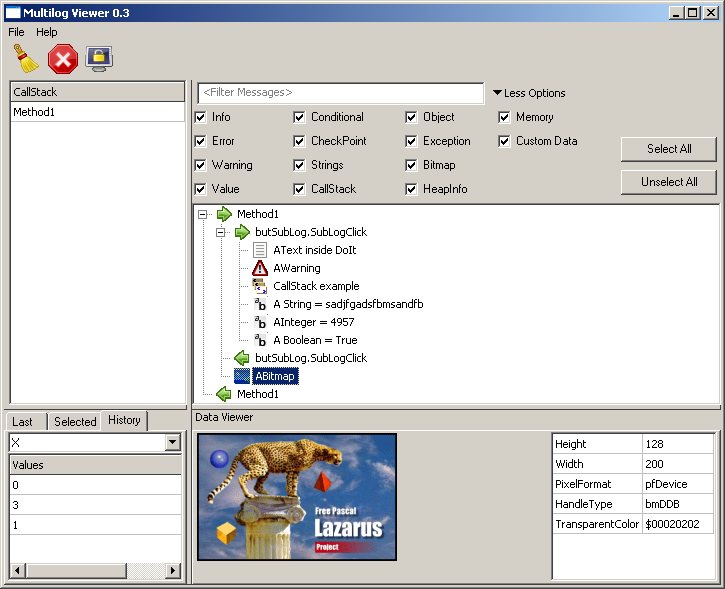
- A log viewer application (MultiLog Viewer) with ability to track watches, callstack and filter messages
- Unique:
- Implements conditional messages (using SendIf method): a message is sent if a boolean criterium is met
- Implements a function (CalledBy) that returns if the current code was called by a method (Useful to debug the LCL)
- Implements SendCallStack and SendHeapInfo: the name says it all
- Named CheckPoints
- Ability to send custom messages through callback functions
Here's the provided Log Viewer in action:
Author
Luiz Américo Pereira Câmara aka Karl Brandt
Contact: pascalive at bol(dot)com(dot)br
License
Modified LGPL
Download
MultiLog library and MultiLogViewer: https://github.com/blikblum/multilog
Change Log
- 22/07/13
- MultiLog 0.6
- Improve compatibility with recent versions of Lazarus/LCL
- Improve TObject/TComponent streaming
- MultiLog 0.6
- 29/03/08
- MultiLog 0.5
- Can be compiled with Delphi
- Enable inline
- Several fixes
- MultiLog Viewer 0.3
- Added ability to see a watch history
- Improved GUI usability
- MultiLog 0.5
- 19/05/2007 - MultiLog 0.4
- Changed license to modified LGPL
- Added named counters
- A message can be associated with more than one class
- 11/02/2007 - Multilog 0.3/Multilog Viewer 0.2
- Multilog
- Added SendCustomData, SendMemory methods
- Added a TLogger descendant (TLCLLogger) which can send LCL specific data (TBitmap for now)
- Cleaned the code
- Multilog Viewer
- Ability to display a memory area as hex values
- Ability to display bitmaps
- Improved usability
- Multilog
- 06/08/2006 - Multilog 0.2
- Implemented overloaded Send method for TObject and Float
- Implemented Watches
- Implemented CheckPoints
- Implemented SendHeapInfo and SendException
- Created a full LogViewer (MultiLog Viewer 0.1) with support for Watches, CallStack and message filtering
- 12/06/2006 - Multilog 0.1
- Initial release
System Requirements
- Base Library (MultiLog unit)
- fpc 2.2.0
- LCL (MultilogLCL unit)
- Lazarus 0.9.24 or above
- SimpleLogViewer
- Lazarus 0.9.24 or above
- Multilog Viewer
- Lazarus 0.9.24 or above
- MultiLog
- Virtual Treeview
- ATBinHex
- Unique Instance
- Lui Controls
Usage
- Some usage examples can be found here
- See the examples included in the demos folder
Simple example
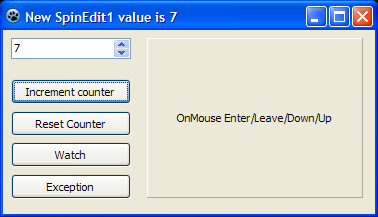
Install multiloglaz package into Lazarus and build MultiLogViewer from it's Viewer directory. Create new application, and add 4 buttons, 1 spinedit, and 1 panel to main form. Replace code with the one below. Start MultiLogViewer, run your application and logging will start. Since we have added both ipc and file channels for logging (in Form's OnCreate method), even if MultiLogViewer is not started we will have logging to 'debug.log' file.
unit Unit1;

{$mode objfpc}{$H+}

interface

uses
  Classes, SysUtils, FileUtil, Forms, Controls, Graphics, Dialogs, StdCtrls,
  Spin, ExtCtrls, MultiLog {must be included for Multilog logging},
  ipcchannel  {logging over IPC channel to MultiLog Viewer application},
  filechannel {logging over file channel to log file};

type

  { TForm1 }

  TForm1 = class(TForm)
    Button1: TButton;
    Button2: TButton;
    Button3: TButton;
    Button4: TButton;
    Panel1: TPanel;
    SpinEdit1: TSpinEdit;
    procedure Button1Click(Sender: TObject);
    procedure Button2Click(Sender: TObject);
    procedure Button3Click(Sender: TObject);
    procedure Button4Click(Sender: TObject);
    procedure FormCreate(Sender: TObject);
    procedure FormDestroy(Sender: TObject);
    procedure Panel1MouseDown(Sender: TObject; Button: TMouseButton; Shift: TShiftState; X, Y: Integer);
    procedure Panel1MouseEnter(Sender: TObject);
    procedure Panel1MouseLeave(Sender: TObject);
    procedure Panel1MouseUp(Sender: TObject; Button: TMouseButton; Shift: TShiftState; X, Y: Integer);
    procedure SpinEdit1Change(Sender: TObject);
  private

  public

  end;

var
  Form1: TForm1;

implementation

{$R *.lfm}

{ TForm1 }

procedure TForm1.FormCreate(Sender: TObject);
begin
  Logger.Channels.Add(TFileChannel.Create('debug.log')); // switch on file logging
  Logger.Channels.Add(TIPCChannel.Create); // switch on ipc logging
  Logger.Send('----------------------------------------------------');
  Logger.Send('Form1 created');
end;

procedure TForm1.FormDestroy(Sender: TObject);
begin
  Logger.Send('Form1 destroyed');
end;

procedure TForm1.Button1Click(Sender: TObject);
begin
  Logger.IncCounter('MyLogCounter');
end;

procedure TForm1.Button2Click(Sender: TObject);
begin
  Logger.ResetCounter('MyLogCounter');
end;

procedure TForm1.Button3Click(Sender: TObject);
begin
  Logger.Watch('MyLogWatch', Caption);
end;

procedure TForm1.Button4Click(Sender: TObject);
var
  Exc: EMathError;
begin
  try
    Exc := EMathError.Create('fake math exception');
    raise Exc;
  except
    on E: Exception do Logger.SendException('Exception: Force fake math exception', E);
  end;
end;

procedure TForm1.Panel1MouseDown(Sender: TObject; Button: TMouseButton; Shift: TShiftState; X, Y: Integer);
begin
  Logger.Send('Panel1MouseDown');
end;

procedure TForm1.Panel1MouseEnter(Sender: TObject);
begin
  Logger.Send('Panel1MouseEnter');
end;

procedure TForm1.Panel1MouseLeave(Sender: TObject);
begin
  Logger.Send('Panel1MouseLeave');
end;

procedure TForm1.Panel1MouseUp(Sender: TObject; Button: TMouseButton; Shift: TShiftState; X, Y: Integer);
begin
  Logger.Send('Panel1MouseUp');
end;

procedure TForm1.SpinEdit1Change(Sender: TObject);
begin
  Logger.EnterMethod('SpinEdit1Change');
  try
    Caption := 'New SpinEdit1 value is ' + IntToStr(SpinEdit1.Value);
    Logger.Send('SpinEdit1.Value', SpinEdit1.Value);
  finally // we want to make sure that each EnterMethod is paired with it's Exitmethod
    Logger.ExitMethod('SpinEdit1Change');
  end;
end;

end.
This is how the result should look like in runtime (if you replace default captions as shown):
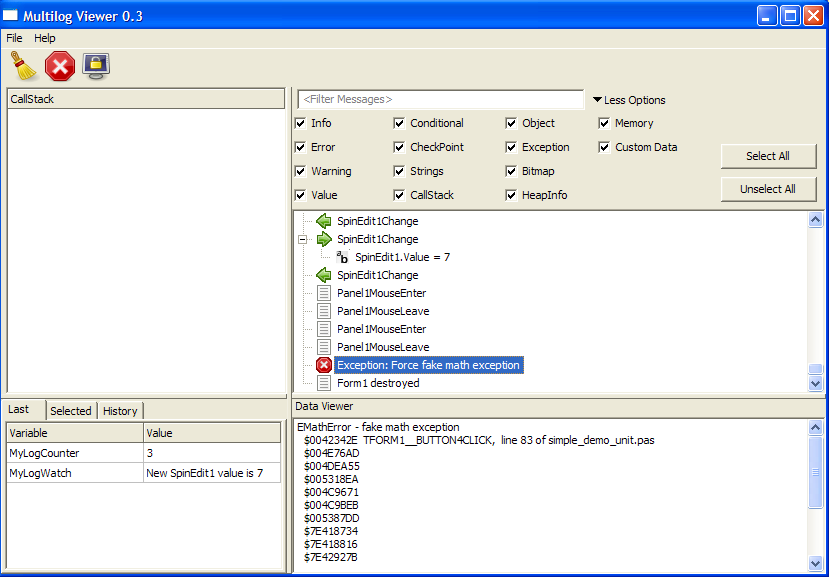
If you want your logged exceptions and stacks to show source code line numbers of the runtime error like on the screenshot above then go to Project / Project Options / Compiler Options / Debugging and switch on check boxes for 'Generate debugging info for GDB' and 'Display line numbers in run-time error backtraces'.
Known Issues
In my setup (Lazarus 0.9.17 + fpc 2.0.4rc2 + Windows XP), is necessary add the directory where is the package sources to the Units path in the Compiler Options. This occurs, i think, because fpc tries to recompile a unit even after finding it in \$(PkgDir)\lib\\\$(TargetCPU)-\$(TargetOS)\\. It seems a fpc bug since sometimes a Internal Error is givenTo override this problem since version 0.2 the unit path of the lazarus package points to \$(PkgDir). This has the drawback of breaking the "multienviroment" schema that separates binaries of different targets used in most packages.As a side effect when compiling projects that requires multilog package, fpc will create duplicated units in the project path and Lazarus IDE warn about them. Just ignore the warnings.
While developing MultiLog i had some problems with inlines (See this [bug](http://www.freepascal.org/mantis/view.php?id=7107)). All inlines were commented. Because of this all calls to the overloaded SendCallStack that has a implicit classes (DefaultClasses) will have SENDCALLSTACK as the first frame. Use the explicit SendCallStack overloaded function as a workaround.Waiting for fpc2.2 to re-enable inline.
See also
- TEventLog documentation Built in support for logging in FPC/Lazarus
- LazLogger Logging support supplied with Lazarus
- log4delphi Another Lazarus logging framework ported from Delphi
From the Free Pascal wiki, page "MultiLog", as it stood on 2021-10-25 after a change by Kai Burghardt, out of the wiki's dump of 2024-05-26. Copyright stays with the author who wrote it, according to the old wiki's Licensing page. If you have concerns about this material, message the admin.