IDE Window: Editor Options Display Gutter
Navigation
- Main Menu - Overview of all the main menu menu items for the IDE.
- IDE Options - Overview of all the options for the IDE.
- Editor Options - Overview of all the options for the IDE source code editor.
Editor Display Options
You can open the Completion and Hints dialog in your IDE via:
- The Main menu: Tools > Options > Editor - Display
- From the source editor window pop-up (right-click) menu: Options > Editor - Display
Overview Gutter
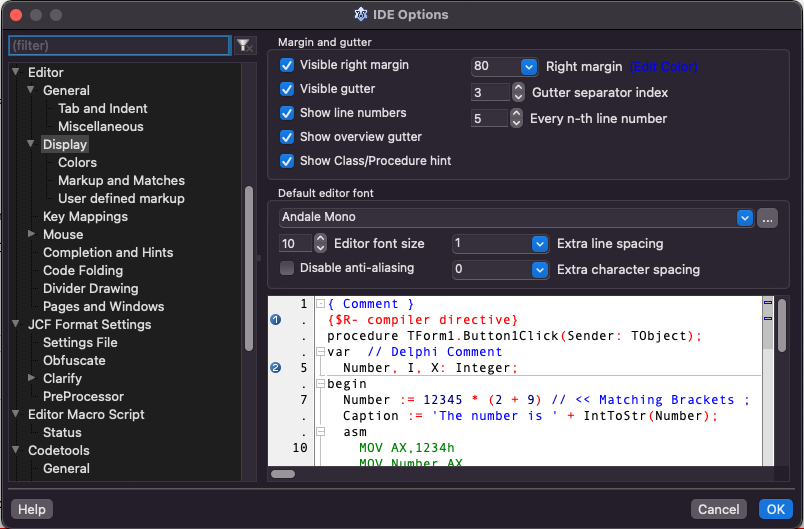
The Lazarus IDE has an optional file overview feature called an "Show overview gutter". This gutter is the thin vertical bar adjacent to the source editor's vertical scrollbar. You can show or hide the overview gutter via the "Show overview gutter" checkbox found on the IDE Options dialog's Editor / Display dialog (the fourth checkbox in the "Margin and gutter" groupbox).

When editing Pascal files the overview gutter shows a compressed summary of line and unit information:
- modified lines: a yellow square shows recent unsaved modifications; green squares show saved modified lines
- left-gutter marks are echoed in compressed form: breakpoints (red rectangles), bookmarks (blue rectangles), compilation errors (orange rectangles)
- interface/implementation/finalization sections are shown in various shades of grey
- the location of the current editor page relative to the rest of the edited file is shown in another shade of grey
If you click on a rectangular coloured mark, you jump to the relevant location in the text. Clicking anywhere on the overview gutter jumps you to the position in the file that gutter point represents, i. e. the top of the gutter represents the start of the file and the bottom of the gutter represents the end of the file.
From the Free Pascal wiki, page "IDE Window: Editor Options Display Gutter", as it stood on 2021-11-04 after a change by Trev, out of the wiki's dump of 2024-05-26. Copyright stays with the author who wrote it, according to the old wiki's Licensing page. If you have concerns about this material, message the admin.