fpcupdeluxe
Deutsch · English · Español · Русский
Overview
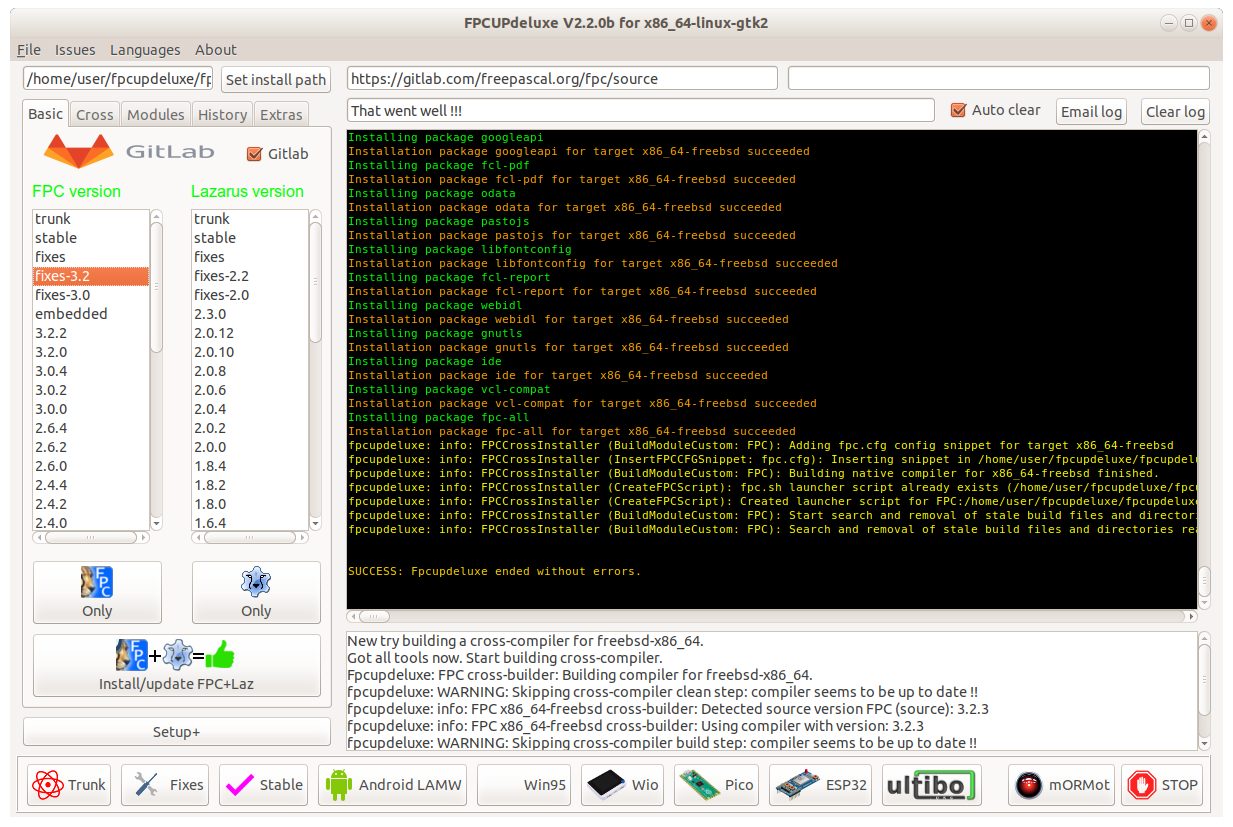
FPCUPdeluxe is a GUI installer for FPC and Lazarus. It's based on fpcup.
Installation of FPC and Lazarus
The main purpose of fpcdeluxe is to provide a means for installing and updating multiple versions of FPC and Lazarus in a self-contained manner. Self-contained meaning that an install by fpcupdeluxe will have no influence on (interference with) your system: Hence you can install multiple versions of FPC and Lazarus.
In order to have the installation working you MUST use the generated link to start the install !
That launcher link contains a line like:
Exec=/P/s/lazarus/lazarus --pcp="/P/s/config_lazarus"directing Lazarus to use the pcp , i.e. primary configuration setting path of "/P/s/config_lazarus" or a similar subdir under /home/ depending on you choice made from the GUI. No fpc or anything is required in the searchpath.
Prerequisites
Debian, Raspbian, Mint gtk2
actual working with Debian Buster and Raspbian Buster
#!/bin/bash
sudo apt-get update
sudo apt-get upgrade

# Missing Packages
sudo apt-get install libx11-dev
sudo apt-get install libgdk-pixbuf2.0-dev
sudo apt-get install libpango1.0-dev
sudo apt-get install libgtk2.0-dev

# if gdb is not installed (eg. Lubuntu)
sudo apt-get install gdb

# GIT is the new SVN
sudo apt-get install git
Debian qt5
#!/bin/bash
sudo apt-get update
sudo apt-get upgrade

# Missing Packages
sudo apt install libqt5pas-dev

# GIT is the new SVN
sudo apt-get install gitRaspbian on RPi2
You need to extend the swap see Lazarus on Raspberry Pi
Advanced settings
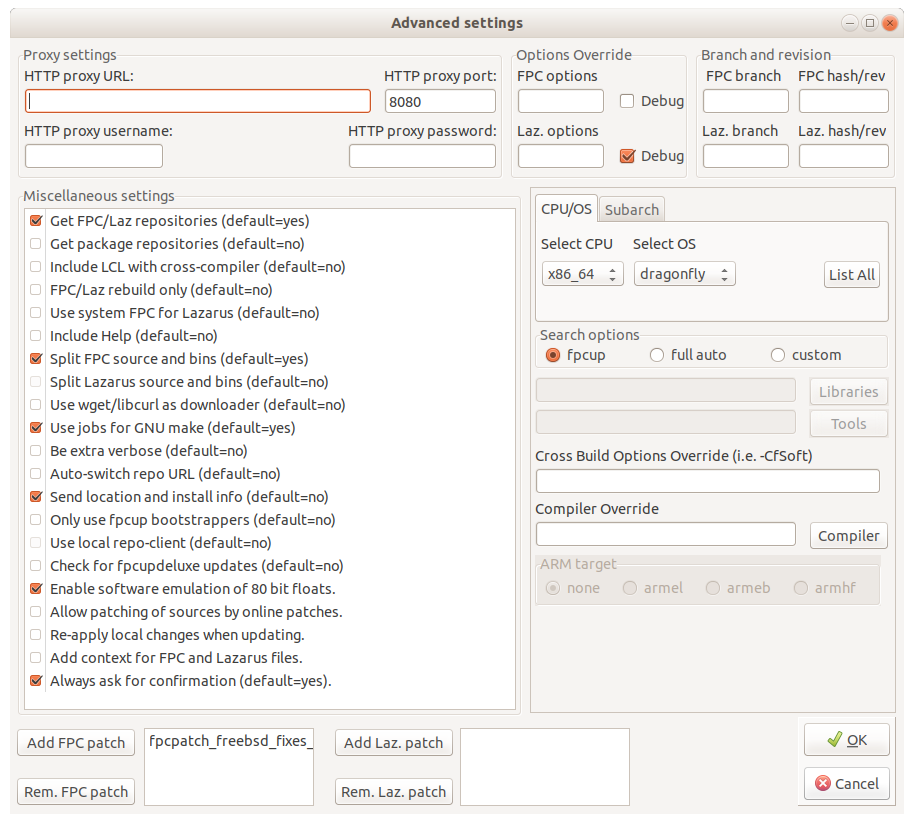
The above screenshot (click Setup+ on mainscreen) shows the advanced settings of FPCUPdeluxe.
Some examples of advanced settings:
- for debugging FPC itself, add "-g -gl -O-" into the "FPC options" field.
- to apply a fix for FreeBSD x64 cross-compiler (which fixes FileExists/DirectoryExists functions on FreeBSD 12), press "Add FPC patch" and browse for relevant patch file.
Cross-compiling
FPCUPdeluxe makes cross-compiling easy: activate "cross" UI tab, select a CPU and an OS, and press "Install compiler". If libraries and/or binary tools are needed, fpcupdeluxe will try to get them online.
Use the link to see what is available at the moment:
- Linux 64bit binary toolchains
- Linux 32bit binary toolchains
- Windows binary toolchains
- System libraries
Cross-compiling from Windows and Linux towards Darwin: the hard way
With the help of fpcupdeluxe, NewPascal or FPC trunk, and a toolset called osxcross/cctools-port, you can crosscompile towards Darwin. This help will concentrate on manually setting up crossing from Windows/Linux towards Darwin (fpcupdeluxe can also do all the auto-magic for you for crossing towards Darwin; see above).
First, you will need to get osxcross/cctools-port, and compile it yourself.
For macOS, you will need the osxcross for FPC that has been adapted for use by FPC.
For iOS/iPhone, you will need the cctools-port for FPC that has been adapted for use by FPC.
Get yourself a SDK, either from your own Mac, or from online sources: Various Mac SDK's
SDKs for iPhone can also be obtained from online sources: Various iPhone SDK's
Build osxcross/cctools-port according to the instructions. For example, on Windows with Cygwin.
Note: Please note: to be able to cross from Windows towards Darwin, you need to have NewPascal or FPC trunk installed !
Use fpcupdeluxe to install NewPascal or FPC trunk.
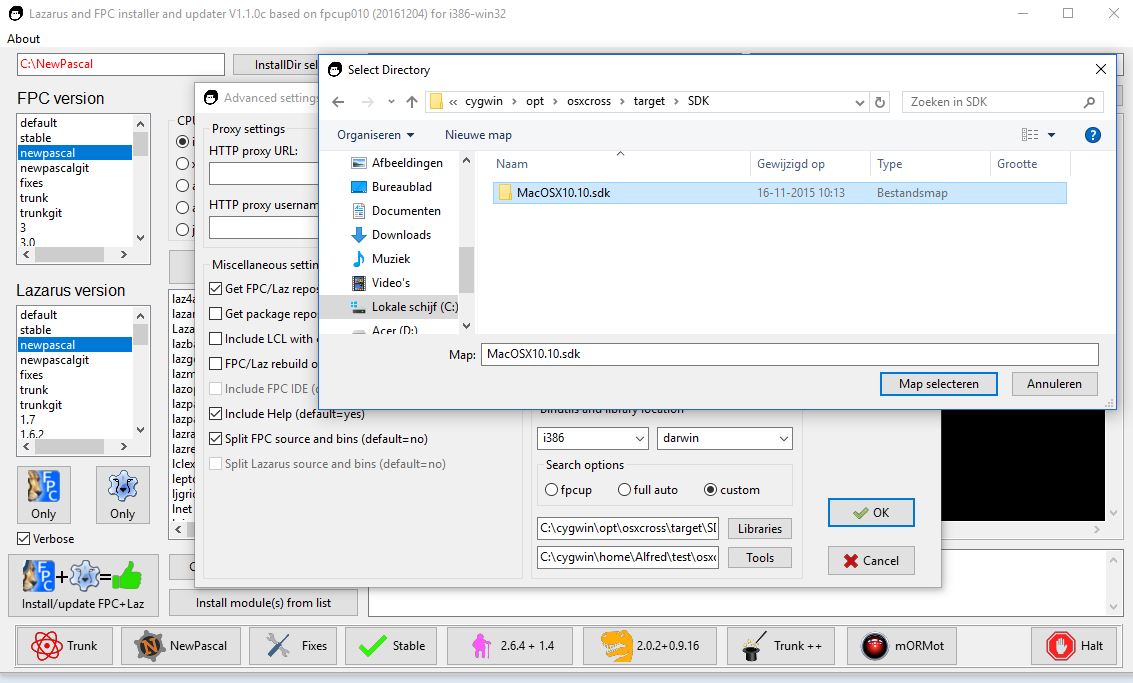
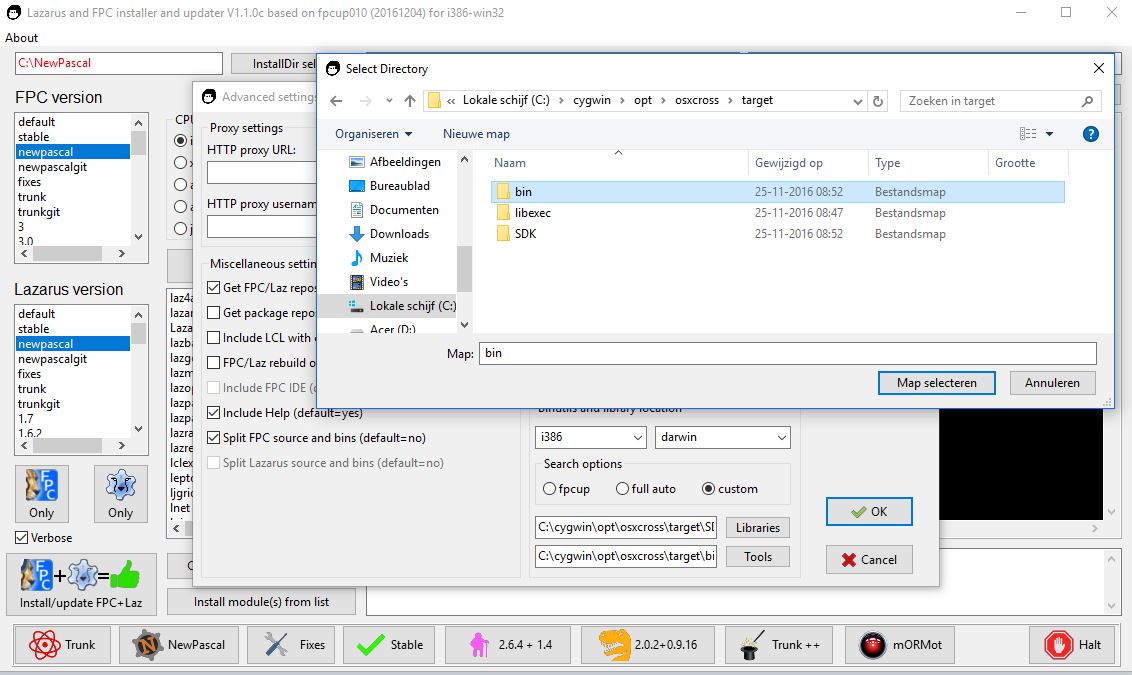
Before building the cross-compiler, you need to inform fpcupdeluxe where to find the Darwin libs (SDK) and the binary tools (build by osxcross/cctools-port). The two screenshot below show how to proceed:
- Choose a CPU-type and an OS (Darwin). Select custom. You should now be able to use the buttons and point fpcupdeluxe to the right locations.
- Now, on the mainscreen, you can select your CPU and OS (Darwin) and build the cross-compiler !
- Again, fpcupdeluxe also has pre-built tools for crossing towards Darwin: using the fpcupdeluxe-auto-magic will be the easiest !!!
Caveats, observations, troubleshooting
- It was observed, that f. often times works on first run on an empty install dir, but subsequents runs, i.e. in order to add controls to the pallette, add the .chm help system asf., often times fail. In case of failure to recompile / make the IDE, the Lazarus binary may be gone, so unless you made a file backup earlier, you cannot start Lazarus anymore.
- copy and save the logfile for reference / troubleshoot.
- adding the help system is easy: just tag it under "advanced settings", saving some manual labour.
- it takes about 10 minutes to make a full new install of fpc + Laz.
- try out new --pcp settings to get a feeling for it, you can always delete the config and start anew (save the pristine fresh content of the --pcp dir right after install).
- Sometimes, fpcupdeluxe hangs when it cannot download OpenSSL library. It's chicken-egg problem - OpenSSL is needed to download from https, so fpcupdeluxe cannot download OpenSSL without OpenSSL. Fpcupdeluxe has its strategy to overcome this, but sometimes it fails. Then, try this workaround - in fpcupdeluxe go to "Extras" tab and click on "get OpenSSL by browser", then unpack the downloaded file to fpcupdeluxe folder (where fpcupdeluxe.exe is located). Now, try again.
Launching an installed Lazarus and fpc instance
For launching the Lazarus GUI, a script is created (in the users home directory) and a launcher (on the desktop) which opens Lazarus with the correct config path & environment. Example, on Linux if installing to a folder named "/home/user/trunk", fpcupdeluxe creates:
 /home/user/Desktop/Lazarus_trunk.desktop (launcher)
 /home/user/Lazarus_trunk  (shell script)
For Linux FPC/lazbuild command line work the following shell script can be used (assumes a bash shell and using example install dir of "/home/user/trunk"):
  #!/bin/sh
  # fpcupdeluxe: FPC home startlink script
  export PATH="/home/user/trunk/fpc/bin/x86_64-linux:/home/user/trunk/lazarus:${PATH}"
  export PPC_CONFIG_PATH="/home/user/trunk/fpc/bin/x86_64-linux"
  exec /bin/bash
Windows equivalent batch file for setting up environment for working from command line (using example install dir of "f:\trunk"):
  REM fpcupdeluxe: FPC home startlink script
  SET PATH=F:\trunk\fpc\bin\x86_64-win64;F:\trunk\lazarus;%PATH%
  SET PPC_CONFIG_PATH=F:\trunk\fpc\bin\x86_64-win64
  cmd.exe
Note: Setting the paths this way is not global and only effects the current terminal shell and child shells.
clang compilation error
On compiling for macOS target on Linux, you can see this error:
clang: error: invalid version number in '-target arm64-apple-macosx11.0.0'Usually it happens on old systems, e.g. Ubuntu 20.04. This is fixable.
-
Install package "clang-12" in package manager
-
Go to /usr/bin and see all clang* symlinks. "clang" is symlink to Clang-10, and "clang-12" is symlink to Clang-12. Adjust symlinks so that "clang" points to Clang-12.
user@PC:~$ ls -l /usr/bin/clang* lrwxrwxrwx 1 root root 24 ноя 7 22:00 /usr/bin/clang -> ../lib/llvm-12/bin/clang lrwxrwxrwx 1 root root 26 мар 20 2020 /usr/bin/clang++ -> ../lib/llvm-10/bin/clang++ lrwxrwxrwx 1 root root 26 апр 20 2020 /usr/bin/clang++-10 -> ../lib/llvm-10/bin/clang++ lrwxrwxrwx 1 root root 24 апр 20 2020 /usr/bin/clang-10 -> ../lib/llvm-10/bin/clang lrwxrwxrwx 1 root root 26 мар 8 2022 /usr/bin/clang++-12 -> ../lib/llvm-12/bin/clang++ lrwxrwxrwx 1 root root 24 мар 8 2022 /usr/bin/clang-12 -> ../lib/llvm-12/bin/clang lrwxrwxrwx 1 root root 28 апр 20 2020 /usr/bin/clang-cpp-10 -> ../lib/llvm-10/bin/clang-cpp lrwxrwxrwx 1 root root 28 мар 8 2022 /usr/bin/clang-cpp-12 -> ../lib/llvm-12/bin/clang-cpp
External links
- See in depth guide for BUILD / MAKE: Build FAQ
- Fpcup by Reinier
- Fpcupdeluxe source
- Latest release
- NewPascal
From the Free Pascal wiki, page "fpcupdeluxe", as it stood on 2023-11-08 after a change by Alextpp, out of the wiki's dump of 2024-05-26. Copyright stays with the author who wrote it, according to the old wiki's Licensing page. If you have concerns about this material, message the admin.