FPDoc Updater
Introduction
FPDoc Updater is a GUI tool for updating FPDoc files. You can find it in lazarus/doceditor/fpdocupdater/ directory.
Features
- uses FPC Makeskel tool for generating FPDoc skeletons
- mass update of FPDoc files for selected Pascal units
- preserves written description in FPDoc elements
- content of removed elements can be moved to different element
- can backup processed FPDoc files
- handles multiple elements with same name
- can show update summary
Usage
Set correct paths for FPDoc files, Pascal units, include files and Makeskel tool.
Hint: The Makeskel tool is in you FPC/bin directory.
Hint: Terminate the application after setting up the paths, to save your changes. The tool tends to crash :-(
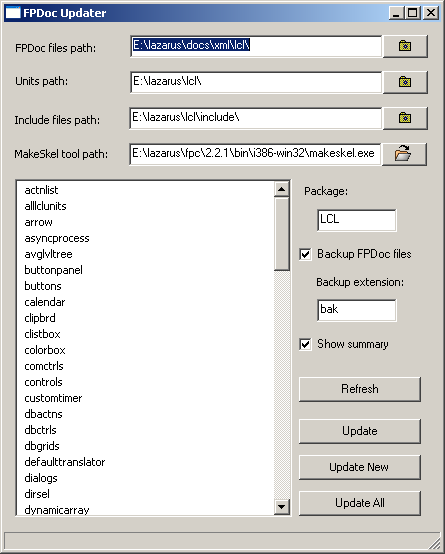
Beware: Uncheck "Show summary" before creating skeletons from multiple files, or you have to click away the summary dialog for every processed file.
Select from the list which FPDoc files should be updated and push Update button, or
Refresh refreshes the file list(?)
Update updates the selected file(s)
Update New updates all new files (marked red)
Update All updates all files.
Usage with other tools
The Updater does not interface well with LazDe.
ToDo: Add feature or instructions for creating packages for processing with the Lazarus Documentation Editor.
From the Free Pascal wiki, page "FPDoc Updater", as it stood on 2014-09-28 after a change by BigChimp, out of the wiki's dump of 2024-05-26. Copyright stays with the author who wrote it, according to the old wiki's Licensing page. If you have concerns about this material, message the admin.