Drawing with canvas/zh CN
Deutsch · English · Français · 中文(中国)
leo_tecnologica@yahoo.com.ar 发布 —— Leonardo Gabriel Calautti
Line (x1, y1, x2, y2)-> 从(x1,y1)到(x2,y2)画线
Rectangle (x1, y1, x2, y2)-> 从(x1,y1)点到(x2,y2)点画矩形
Ellipse (x1, y1, x2, y2)-> 从(x1,y1)点到(x2,y2)点画椭圆
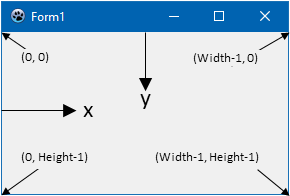
如,下面的代码,将绘制对角线,在Button1Click间:
procedure TForm1.Button1Click(Sender: TObject);
begin
  canvas.Line(0,0, form1.Width,form1.Height);
  canvas.Line(0,form1.height,form1.width,0);
end;如何绘制矩形和椭圆在里面使用Rectangle和Ellipse;在调用Brush和Pen时,使用color设置颜色,该属性给绘制对象填充、线条的颜色。在绘制前,顺序很重要:
 canvas.Brush.color:= clred;
 canvas.Ellipse(195, 117, 205, 128);
 canvas.Brush.color:= clblue;
 canvas.Rectangle (192, 130,208,160);
 canvas.Brush.color:= clgreen;
 Canvas.Rectangle (187, 130,191,162);
 canvas.Brush.color:= clyellow;
 Canvas.Rectangle (209, 130,213,162);
 canvas.Brush.color:= clmaroon;
 Canvas.Rectangle (193,161,199,200);
 canvas.Brush.color:= clpurple;
 Canvas.Rectangle (201,161,207,200);
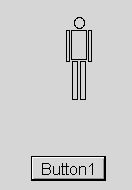
如果按着步骤,你可以做到:
From the Free Pascal wiki, page "Drawing with canvas/zh CN", as it stood on 2020-02-14 after a change by Trev, out of the wiki's dump of 2024-05-26. Copyright stays with the author who wrote it, according to the old wiki's Licensing page. If you have concerns about this material, message the admin.