Carbon interface internals/de
Deutsch · English
Einleitung
Diese Seite bietet einen Überblick über die LCL Carbon Schnittstelle für macOS und soll neuen Entwicklern helfen.
Für die Installation und Erzeugung einer ersten Carbon Anwendung lesen sie zunächst Carbon Interface.
Andere Schnittstellen
- Lazarus known issues (things that will never be fixed) - Eine Liste mit Kompatibilitätsproblemen der Schnittstellen
- Win32/64 Interface - Die winapi Schnittstelle für Windows 95/98/Me/2K/XP/Vista, aber nicht CE
- GTK2 Interface - Die gtk2 Schnittstelle für Unixes, macOS, Windows
- Carbon Interface - Die Carbon Schnittstelle für macOS
- Qt Interface - Die Qt 4 Schnittstelle für Unixes, macOS und linux-basierte PDAs
- Windows CE Interface - Für Pocket PC und Smartphones
- fpGUI Interface - Ein Widgetset komplett in Object Pascal geschrieben
Artikel über die Entwicklung von Schnittstellen
- Carbon interface internals - Wenn du helfen willst, die Carbon Schnittstelle zu verbessern
- Windows CE Development Notes - Für Pocket PC und Smartphones
- Adding a new interface - Wie man eine neue Widgetset-Schnittstelle entwickelt
Dokumentation über Carbon
- Apple Carbon docs
- Apple Mailing List search
- Carbon Buch zum Download
- Carbon Dev
- "Learning Carbon" sample book chapter
Die Carbon API unit von FreePascal ist FPCMacOSAll.pas in /usr/local/share/fpcsrc/packages/extra/univint.
Carbon Schnittstelle Entwicklungs-Grundlagen
- Die macOS Zielversion ist 10.4
- Vermeiden sie die Verwendung von veralteten oder ausgemusterten APIs und Funktionen (z.B. QuickDraw vs. Quartz 2D)
- Verwenden sie den Objektansatz
- Prüfen sie die Ergebnisse von Carbon Aufrufen mit der OSError Funktion
- erwenden Sie UTF-8 kodierte Zeichenketten zwischen LCL und dem Carbon widgetset (für zukünftige Lazarus Unicode Unterstützung)
Was funktioniert bereits ?
- Features - siehe Roadmap#Status_of_features_on_each_widgetset
- Formulare und Bedienelemente - siehe Roadmap Widgetset dependent components
- Erstellen von TOpenGLControl mit AGL Kontext (siehe components/opengl/)
- Maus Ereignisse
- Tastatur Ereignisse (VK_ mapping für fremde Tastaturen muss noch getestet werden)
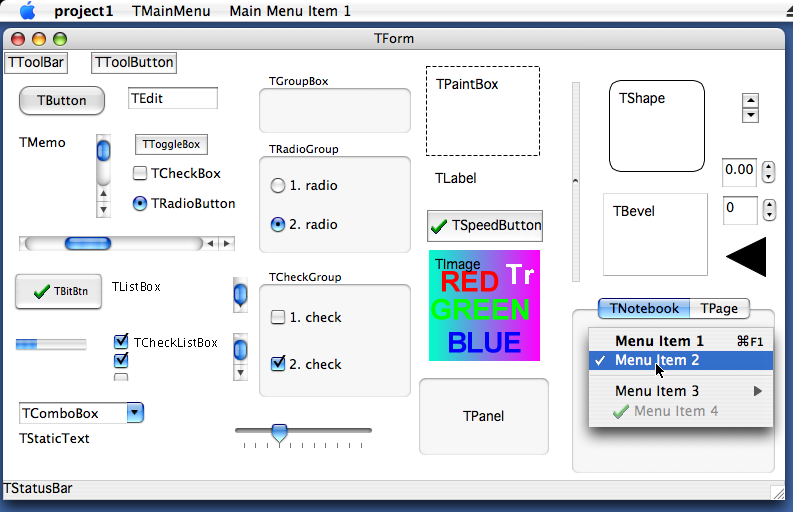
Was muss als nächstes getan werden ?
Siehe Bug Tracker Carbon open issues
Carbon IDE Bugs
<thead>
</thead> <tbody>
File New should be Cmd+N<br /> File Save As should be Shift+Cmd+S<br /> File Quit should be Cmd+Q<br /> Search Find should be Cmd+F<br /> Search Find Next should be Cmd+G<br /> Search Find Previous should be Shift+Cmd+G<br /> (Goto line and Procedure List need to be reassigned)<br /> Option+Cmd+F does not bring up Search Results<br /> F11 behaves weird!</td>
</tbody>
Siehe Bug Tracker Carbon IDE open issues
Implementation Details
Keyboard
- Apple Command key is mapped to ssCtrl per Apple Guidelines
- Apple Control key is mapped to ssMeta
- Apple Option key is mapped to its inscription, i.e. ssAlt
- Virtual key codes mapping is not reliable (depends on keyboard language layout!)
Application
- Title: You cannot change it at runtime. You have to set it in Application Bundle.
- OnDropFiles event is fired when file is dropped on application dock icon or opened via Finder if is associated. You have to enable this event in Application Bundle.
Drawing and measuring text precisely in parts
If you want to draw (via TextOut, TextRect) or measure (via TextWidth, TextHeight) text divided into various parts and rely it will be displayed same each time not depending on its division, you have to disable some default typographic features (like kerning, fractional positioning, ...) of Canvas. You can choose one of the following:
- CarbonWidgetSet.SetTextFractional(Canvas, False); // from CarbonInt unit
- TCarbonCustomControl(CustomControl.Handle).TextFractional := False; // from CarbonPrivate unit
- TCarbonDeviceContext(Canvas.Handle)..TextFractional := False; // from CarbonCanvas unit
Screenshot taking
The only possible efficient way of taking a screenshot on macOS is using OpenGL. Apple provides a demonstration function which returns a CGImageRef with the screenshot. This function was converted to Pascal and is available on the glgrab.pas unit on the carbon interface directory. This function requires the Apple-specific parts of the Apple OpenGL headers, and those didn't exist yet in Pascal at this point, so the headers were translated and are placed on opengl.pas until they are released on a stable Free Pascal.
It isn't possible to directly access the bytes of a CGImageRef, and the Screenshot taking rountine (TWidgetset.RawImage_fromDevice) requires doing that, so the image needs to be drawn to a CGContextRef which uses a memory area allocated by us as buffer. This painting has the great advantage of converting from the internal format of the screenshot bytes to the very convenient ARGB, 32-bits depth, 8-bits per channel format that is default to LCL.
Kompatibilitätsprobleme
These are things that will probably never be solved.
Mouse.CursorPos changing does not generate mouse (move) events
Release mouse capture is not supported
Kommandozeilenparameter
Because Carbon applications are executed via Application Bundle, command line parameters are not passed. You have to use OnDropFiles event to detect openning associated files.
Shortcuts indication is not supported
Drawing on Canvas outside OnPaint event is not supported
Drawing on screen device context is not supported
TCustomControl.Color of clBtnFace makes its background transparent
TWinControl.Font fsStrikeOut wird nicht unterstützt
TForm
- Icon wird nicht unterstützt
- ShowInTaskbar wird nicht unterstützt
TEdit.PasswordChar different then default is not supported
TMemo.WordWrap when is disabled, does not allow to scroll text horizontally
TListBox.Columns wird nicht unterstützt
TComboBox
- OnDropDown is called when set focus
- OnCloseUp is called when released focus
- DroppedDown does not show drop down list when style is csDropDownList
- DropDownCount wird nicht unterstützt
- Style: csSimple, csOwnerDrawFixed und csOwnerDrawVariable werden nicht unterstützt
TPanel.Bevelxxx: bvLowered und bvSpace werden nicht unterstützt
TBitBtn.Spacing is not supported
TTrackBar
- LineSize wird nicht unterstützt
- ScalePos wird nicht unterstützt
- TickMarks werden nicht unterstützt
TProgressBar
- BarShowText wird nicht unterstützt
- Smooth wird nicht unterstützt
- Step wird nicht unterstützt
TColorDialog.Title is not supported
Wie man ein neues Bedienelement hinzufügt
Zum Beispiel TButton.
TButton wird definiert in lcl/buttons.pp. Dies ist der plattformunabhängige Teil der LCL, welcher vom normalen LCL Programmierer benutzt wird.
Seine widgetset Klasse befindet sich in lcl/widgetset/wsbuttons.pp. Dies ist die plattformabhängige Basis für alle widgetsets (carbon, gtk, win32, ...).
Seine Carbon Schnittstellenklasse ist in lcl/interfaces/carbon/carbonwsbuttons.pp:
 TCarbonWSButton = class(TWSButton)
 private
 protected
 public
   class function  CreateHandle(const AWinControl: TWinControl; const AParams: TCreateParams): TLCLIntfHandle; override;
 end;
Jede WS Klasse, die tatsächlich etwas implementiert, muss registriert werden. Schauen sie sich den initialization Abschnitt am Ende der carbonwsXXX.pp Unit an:
RegisterWSComponent(TCustomButton, TCarbonWSButton);TCarbonWSButton setzt CreateHandle außer Kraft und erzeugt eine Carbon-Schaltfläche-Helfer-Klasse namens TCarbonButton in carbonprivate.pp, die die Schaltfläche in Carbon erzeugt und die Event-Handler installiert.
From the Free Pascal wiki, page "Carbon interface internals/de", as it stood on 2019-12-17 after a change by Trev, out of the wiki's dump of 2024-05-26. Copyright stays with the author who wrote it, according to the old wiki's Licensing page. If you have concerns about this material, message the admin.