Adding an About dialog as a property to a custom component
Summary
This article is for writers of Lazarus visual components (descended from TComponent or descendants)
- With the addition of a few lines of code to your component, it can display an 'About' property with an ellipsis button in the IDE Object Inspector
- When the application programmer using your component clicks the button in the Object Inspector, a customised modal 'About' dialog is displayed with your info on it.
- As well as an 'OK' button, the dialog can also display a 'License' button
- When clicked, this displays one of the standard licenses (GPL, LGPL etc) in a modal window
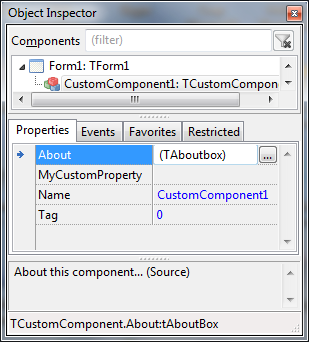
This is what the application programmer would see when he drops your component onto a form:
Object Inspector example screenshot
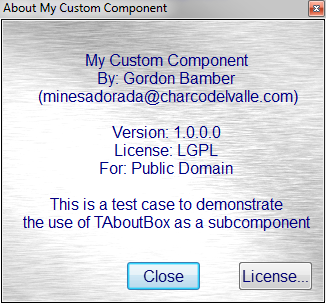
About dialog example screenshot
- Clicking the ellipse button shows this:
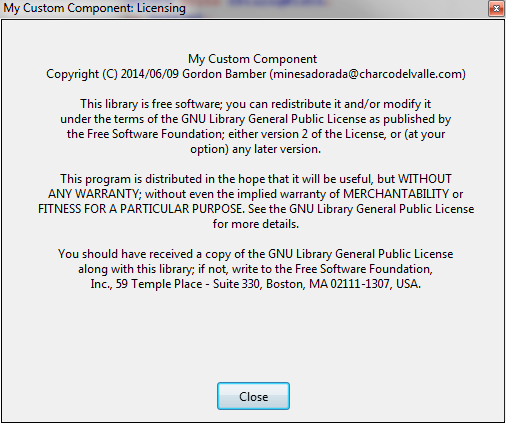
License screen example screenshot
- Clicking the License button shows this:
Download example code
You can download the full source as described in this article from the lazarus CCR here
Adding an About property to your new or existing component
- Add the files aboutcomponentunit.pas and license.lrs to your component directory
- Rename aboutcomponentunit.pas to about<yourcomponentname>unit.pas
- In the pas file rename the Unit to match (1)
- Open the renamed pas file and do Search/Replace to change all instances of "TAboutComponent" to TAbout<yourcomponentname>
- In the line TAboutComponent = Class(TComponent), change the ancestor to your component's ancestor (if it's not TComponent)
- Add the edited pas file to your component's package
- In your component's class declaration, change it's ancestor to TAbout<yourcomponentname> (from step 3)
- Compile, install and see the new clickable 'About' property in your component!
Configuring the About property dialog
- In your component's Constructor Create() set some, all or none of the following properties:
- AboutBoxComponentName (string)
- AboutBoxWidth (integer)
- AboutBoxHeight (integer)
- AboutBoxDescription (string - can contain LineEndings)
- AboutBoxBackgroundColor (TColor, like clWhite)
- AboutBoxFontName (string)
- AboutBoxFontSize (integer)
- AboutBoxVersion (string)
- AboutBoxAuthorname (string)
- AboutBoxOrganisation (string)
- AboutBoxAuthorEmail (string)
- AboutBoxLicenseType (string e.g. 'GPL', ModifiedGPL' etc)
- You will have to recompile and reinstall your component to see the results.
Example
- Using the component ScrollText (available here)
- I have already renamed the AboutComponentunit to AboutScrolltextunit, and changed the class name from TAboutComponent to TAboutScrollText
- TScrolltext is dereived from TGraphicControl so in the AboutScrollText unit I alter:
TAboutScrollText = class(TComponent)to
TAboutScrollText = class(TGraphicControl)- Then in my scrolltext unit, I change
TScrollingText = class(TGraphicControl)to
TScrollingText = class(TAboutScrollText)- Now the Scrolltext component has an 'About' property, but with default values.
- So in my TScrollingText constructor, I now set my own values:
constructor TScrollingText.Create(AOwner: TComponent);
begin
 inherited Create(AOwner);
..other constructor code..
   // About dialog
 AboutBoxComponentName:='ScrollingText component';
 AboutBoxWidth:=400;
 // AboutBoxHeight (integer)
 AboutBoxDescription:='Component that shows a scrolling window.' + LineEnding +
 'Use Lines property to set text and Active=True' + LineEnding +
 'to use the component';
 AboutBoxBackgroundColor:=clWindow;
 AboutBoxFontName:='Arial';
 AboutBoxFontSize:=10;
 AboutBoxVersion:=C_VERSION;
 AboutBoxAuthorname:='Gordon Bamber';
 AboutBoxOrganisation:='Public Domain';
 AboutBoxAuthorEmail:='minesadorada@charcodelvalle.com';
 AboutBoxLicenseType:='LGPL';
end;- I then compile and install the scroller component to the IDE palette, and the 'About' property is part of the component.
See Also
From the Free Pascal wiki, page "Adding an About dialog as a property to a custom component", as it stood on 2016-07-15 after a change by Arent, out of the wiki's dump of 2024-05-26. Copyright stays with the author who wrote it, according to the old wiki's Licensing page. If you have concerns about this material, message the admin.