ATSynEdit EControl adapter
Intro
ATSynEdit has adapter for lexers from SynWrite editor. It's EControl lexer engine.
- Use repo https://github.com/Alexey-T/EControl
- Use repo https://github.com/Alexey-T/ATSynEdit_Ex
Unit ATSynEdit_Adapter_EControl contains class TATAdapterEControl. You must create object of this class and assign this object to editor property AdapterHilite.
For ex, if you have editor object:
  //form's OnCreate
  Adapter:= TATAdapterEControl.Create(Self);
  Edit1.AdapterHilite:= Adapter;
For ex, if you have 2 editor objects with the same text-source (see help topic ATSynEdit):
  Adapter:= TATAdapterEControl.Create(Self);
  Adapter.AddEditor(Ed1);
  Adapter.AddEditor(Ed2);
  Ed1.AdapterHilite:= Adapter;
  Ed2.AdapterHilite:= Adapter;
Properties
- Lexer: TecSyntAnalyzer. You must set this prop from SyntaxManager object. SyntaxManager is a collection of lexers, which is loaded from .lxl file. After you load SyntaxManager, get its any item and assign it to Lexer prop. Example exists in demo of ATSynEdit. Set to nil to disable adapter.
- DynamicHiliteEnabled: boolean. This enables dynamic highlight, ie highlight of tokens depending on caret position. If enabled, adapter reads editor's caret-pos-changed event and recalculates hiliting if needed. Some lexers use this feature: HTML hilites tags with green if caret is inside tag; Pascal hilites "begin"/"end" with green if caret is inside block; rare C-like lexers hilite brackets.

- OnParseBegin, OnParseDone: these events called by adapter on analyzing start and after analyzing finish. If big file parsed, OnParseDone will fire after few seconds, during which user may edit/scroll file.
- procedure AddEditor(AEdit: TATSynEdit). This adds editor to internal list. This is to support 2+ editors which have single text-source (application has split-tab feature). Pass nil to clear internal list and disable adapter.
Syntax tree
Support for syntax tree exists like in SynWrite. Many lexers support tree (most C-based, Pascal, HTML, CSS, Python...). You need to add TTreeView to your form and use it in this API. Set tree read/only.
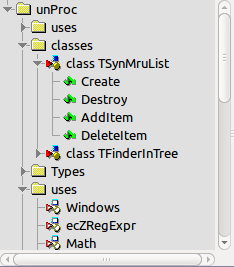
procedure TreeFill(ATree: TTreeView);It fills tree with nodes from adapter. Call it only after parsing is done. On parsing start, better clear the tree.
property TreeBusy: booleanIt is true during filling of tree by TreeFill.
procedure TreeShowItemForCaret(Tree: TTreeView; P: TPoint);This focuses tree node, for given caret position. Only if position has a node.
    function TreeGetPositionOfRange(R: TecTextRange): TPoint;
    function TreeGetRangeOfPosition(P: TPoint): TecTextRange;
These get caret position from a range, or range from caret position. Range is object, it's stored in TTreeNode.Data of nodes. If you want to goto clicked tree item, add OnDblClick event to tree, and use this API. Example:
procedure TfmMain.TreeDblClick(Sender: TObject);
var
  R: TecTextRange;
  P: TPoint;
begin
  if Tree.Selected=nil then exit;
  if Tree.Selected.Data=nil then exit;
  R:= TecTextRange(Tree.Selected.Data);
  P:= CurrentFrame.Adapter.TreeGetPositionOfRange(R);
  FTreeClick:= true;
  CurrentEditor.DoGotoPosEx(P);
  CurrentEditor.SetFocus;
  FTreeClick:= false;
end;
Syntax tree icons
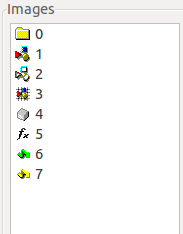
Many lexers support icons in tree (e.g. Pascal, C#). To show icons, use for tree ImageList with these 8 icons: folder, parts-1, parts-2, parts-3, box, func, arrow-1, arrow-2. Example of icons from CudaText:
From the Free Pascal wiki, page "ATSynEdit EControl adapter", as it stood on 2020-02-09 after a change by Trev, out of the wiki's dump of 2024-05-26. Copyright stays with the author who wrote it, according to the old wiki's Licensing page. If you have concerns about this material, message the admin.